
Summary
A fully loaded ROG Strix SCAR 18 can cross the $3,500 mark, yet the Republic of Gamers badge it carries has grown into one of the most recognizable names in PC gaming since ASUS launched the sub-brand in 2006, as...
Table of contents
- 1 The ROG Strix in Context: A Quick Background
- 2 ASUS ROG Strix Specifications at a Glance
- 3 Design, Build, and Display
- 4 Gaming Performance and Real-World Benchmarks
- 5 Thermals, Acoustics, and Cooling
- 6 Battery Life and Portability
- 7 Pricing and How the Strix Compares
- 8 Pros and Cons
- 9 Who Should Buy the ROG Strix?
- 10 Frequently Asked Questions
- 10.1 Is the ASUS ROG Strix a good gaming laptop?
- 10.2 What is the difference between ROG Strix and ROG Strix SCAR?
- 10.3 Can you upgrade the RAM and storage on a ROG Strix?
- 10.4 How long does the ROG Strix battery last?
- 10.5 Does the ROG Strix run hot?
- 10.6 Is the ROG Strix worth the price compared to a desktop?
- 10.7 What display does the ROG Strix have?
- 11 Related Reading
- 12 Sources
A fully loaded ROG Strix SCAR 18 can cross the $3,500 mark, yet the Republic of Gamers badge it carries has grown into one of the most recognizable names in PC gaming since ASUS launched the sub-brand in 2006, as documented in the Republic of Gamers entry on Wikipedia. That distance between sticker price and mainstream popularity is the first thing worth examining. The ROG Strix family is not one laptop but a tiered range, stretching from the relatively attainable Strix G16 to the flagship SCAR 18, and each tier targets a different kind of player.
This review looks at what the ROG Strix gets right, where it asks for compromise, and how its 2025 hardware holds up against rivals. We cover the silicon inside, the display, the cooling system that defines high-end gaming notebooks, real battery expectations, and the pricing logic across the lineup. The goal is a clear read on whether a Strix belongs on your desk or in your bag.
The ROG Strix in Context: A Quick Background
ASUS itself dates back to 1989 and grew from a motherboard maker into a full-line PC manufacturer, a history laid out in the company profile on Wikipedia. Republic of Gamers arrived later as a dedicated enthusiast brand, and within it the Strix line settled into the role of the mainstream performance series. Above the standard Strix sits the Strix SCAR, ASUS tuning the SCAR variants for competitive and high-refresh play.
Understanding that hierarchy matters because reviews online often blur the names. A Strix G16 and a Strix SCAR 18 share design language and software, but they are built for different budgets and different thermal ceilings. When shoppers compare a Strix against another brand, they are usually comparing a specific tier, not the whole family. Our broader gaming laptop buyer’s guide walks through how to match a tier to your needs before you fixate on a single model.
The 2025 generation marks a notable jump. ASUS moved the higher SCAR models to Intel’s Core Ultra 9 275HX processor and NVIDIA’s Blackwell-based GeForce RTX 50 series mobile graphics. That GPU generation introduced DLSS 4 with Multi Frame Generation, a feature set summarized in the GeForce RTX 50 series article on Wikipedia. The result is a meaningful frame-rate gain over the previous RTX 40 generation in supported titles.
ASUS ROG Strix Specifications at a Glance
The table below reflects a top-tier 2025 Strix SCAR 18 configuration as listed in ASUS published specifications. Lower tiers in the family scale these numbers down, but the platform features carry across the range. If any of the terms look unfamiliar, our explainer on gaming laptop specs breaks down what each component actually does.
| Component | Flagship Strix SCAR 18 (2025) |
|---|---|
| Display | 18-inch ROG Nebula HDR Mini LED, 2560 x 1600, 240Hz, VESA DisplayHDR 1000 |
| Processor | Intel Core Ultra 9 275HX (up to) |
| Graphics | NVIDIA GeForce RTX 5090 Laptop GPU (up to 175W total graphics power) |
| Memory | Up to 64GB DDR5-5600, dual-channel SO-DIMM |
| Storage | Up to 4TB PCIe 4.0 NVMe across two M.2 slots |
| Keyboard | Per-key RGB; optical-mechanical option on select models |
| Battery | 90Wh lithium-ion |
| Connectivity | Thunderbolt 5, USB-C, HDMI 2.1, 2.5G Ethernet, Wi-Fi 7 |
| Weight | About 3.1 kg (6.8 lb) |
| Operating system | Windows 11 |
Design, Build, and Display
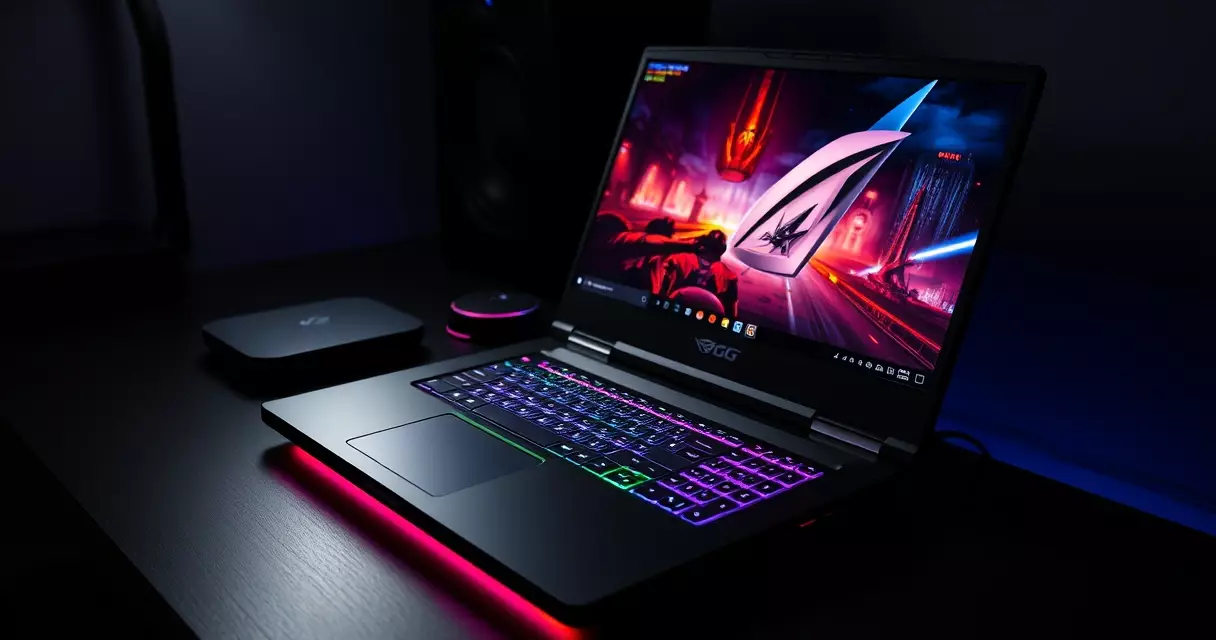
Strix laptops favor a confident, gamer-forward look rather than a subtle one. The chassis blends aluminum and polycarbonate, with a slim-bezel screen and an RGB light bar wrapping the front edge. Higher SCAR units add a translucent lid section and per-key lighting. Build quality feels solid for the class, though the larger 18-inch shells flex slightly under firm pressure, which is typical of big-panel notebooks.
The display is the standout. ASUS pairs a 2560 x 1600 resolution with a 240Hz refresh rate, and the SCAR tiers use a Mini LED backlight branded ROG Nebula HDR. Mini LED panels use thousands of tiny dimming zones for deeper contrast and brighter highlights than conventional backlights, a technique explained in the Mini-LED overview on Wikipedia. The panel carries VESA DisplayHDR 1000 certification, meaning it targets a 1,000-nit peak brightness for HDR content per ASUS specifications.
That combination produces a screen that is sharp for fast shooters and rich enough for movies and creative work. The 16:10 aspect ratio gives extra vertical space for browsing and timelines compared to a 16:9 panel. Color coverage is strong out of the box, which helps if you edit photos or video between gaming sessions. Many components inside the chassis are serviceable too, and our gaming laptop upgrade guide covers what owners can realistically swap later.
Gaming Performance and Real-World Benchmarks
Raw performance is where the Strix earns its price. With an RTX 50-class GPU running at up to 175W of total graphics power per ASUS specifications, the flagship handles modern titles at the panel’s native 2560 x 1600 resolution with high settings. Ray tracing remains demanding, but the GPU’s hardware acceleration keeps it playable in most current releases.
The bigger story is software. DLSS 4 uses AI to render fewer pixels and reconstruct the rest, and its Multi Frame Generation mode can insert additional frames between rendered ones. The underlying upscaling technology is described in the Deep Learning Super Sampling article on Wikipedia. In supported games, this can multiply on-screen frame rates well beyond what the GPU draws natively, which is how high-refresh play at this resolution becomes realistic on a laptop.
A MUX switch with NVIDIA Advanced Optimus lets the system route graphics directly to the discrete GPU, removing the integrated chip as a bottleneck during gaming. CPU-heavy tasks benefit from the Core Ultra 9’s high core count, which also speeds up video exports and compiling. Sustained performance depends heavily on cooling, the subject of the next section.
Thermals, Acoustics, and Cooling
High-wattage components generate real heat, and the Strix leans on an aggressive cooling stack to keep clocks high. ASUS uses a multi-fan design with arc-flow blades, a vapor chamber on the top SKUs, and liquid metal compound on the processor for better heat transfer. Under a heavy load, the fans get loud in the performance profile, so a headset is close to mandatory for serious sessions.
The Armoury Crate software exposes several fan profiles, letting you trade noise for temperature or vice versa. Quiet and balanced modes keep acoustics reasonable for everyday work, while turbo unlocks the full power budget. Keeping vents clear and dust out matters more on machines like this than on a thin ultrabook, and our guide on gaming laptop cooling and overheating goes deeper on day-to-day thermal care.
Power draw is the trade-off behind the heat. A gaming laptop running its GPU near 175W and a high-core-count CPU pulls far more than an office notebook, which is why efficiency programs such as the U.S. ENERGY STAR initiative track computer power use, as outlined by ENERGY STAR for computers. Expect meaningful electricity use during long sessions, and plan for the bundled high-watt power adapter rather than a slim USB-C charger.
Battery Life and Portability
Battery life is the predictable weak point. The 90Wh pack per ASUS specifications sits just under the 100Wh ceiling that the U.S. Federal Aviation Administration sets for lithium batteries carried onto aircraft without special approval, a limit published in the FAA PackSafe lithium battery guidance. That ceiling is why most flagship gaming laptops top out near 90Wh.
In practice, light tasks like web browsing and document work can stretch toward several hours, while gaming unplugged drains the battery in roughly an hour and also caps performance. This is normal for the category rather than a Strix-specific flaw. If endurance is a priority for you, a smaller Strix G16 generally lasts longer than the 18-inch SCAR, and the tips in our gaming laptop battery life guide help squeeze out more runtime.
Portability follows the same logic. At roughly 3.1 kg for the 18-inch model, plus a sizable charger, the flagship is a desktop replacement you can move, not a daily commuter. The 16-inch tiers are friendlier for backpacks. Buyers who rarely move their machine will care less about weight and more about the cooling headroom the larger chassis provides.
Pricing and How the Strix Compares
Pricing spans a wide range because the Strix family does. The table below shows approximate starting prices for representative 2025 tiers based on ASUS and U.S. retailer listings at the time of writing. Actual prices shift with configuration, promotions, and stock.
| Model | Processor | Max GPU | Display | Approx. starting price |
|---|---|---|---|---|
| ROG Strix G16 | Core Ultra 9 | RTX 5070 Ti Laptop | 16-inch QHD+ 240Hz | ~$1,800 |
| ROG Strix SCAR 16 | Core Ultra 9 275HX | RTX 5080 Laptop | 16-inch 2.5K 240Hz Mini LED | ~$2,800 |
| ROG Strix SCAR 18 | Core Ultra 9 275HX | RTX 5090 Laptop | 18-inch 2.5K 240Hz Mini LED | ~$3,500 |
Against rivals, the Strix sits in familiar company. The Razer Blade 16 offers a slimmer, more premium-feeling chassis at a higher price for similar internals, while the Lenovo Legion Pro 7i competes closely on performance and often undercuts the SCAR on cost. The Strix differentiates on its Mini LED display, deep software customization, and serviceable internals. Shoppers weighing a laptop against a tower should also read our gaming laptop versus desktop comparison, since a desktop still delivers more performance per dollar.
Pros and Cons
No laptop is right for everyone, and the Strix is no exception. The strengths cluster around performance and the screen, while the weaknesses are the usual cost of high-end mobile hardware.
- Pros: Top-tier gaming performance, excellent 240Hz Mini LED display on SCAR tiers, capable cooling system, upgradeable RAM and storage, strong port selection with Thunderbolt 5.
- Cons: Loud under heavy load, short battery life when gaming, heavy with a bulky charger on the 18-inch model, premium pricing at the flagship end.
Who Should Buy the ROG Strix?
The Strix suits players who want desktop-class frame rates in a single package they can occasionally relocate. Competitive gamers gain the most from the 240Hz panel, while creators benefit from the bright Mini LED screen and high core counts. Anyone who values silence, all-day battery, or a featherweight bag will be happier elsewhere.
Budget shapes the decision as much as taste. The Strix G16 is the sensible entry point for most buyers, the SCAR 16 hits a strong balance of power and size, and the SCAR 18 is for those who want maximum performance and accept the weight and price. Before committing, it is worth working through the questions in our guide on how to choose a gaming laptop to confirm the tier matches how you actually play.
Frequently Asked Questions
Is the ASUS ROG Strix a good gaming laptop?
Yes, the ROG Strix ranks among the stronger gaming laptops available, particularly in its SCAR tiers. It pairs current Intel Core Ultra processors with NVIDIA RTX 50 series graphics, a 240Hz Mini LED display on higher models, and an aggressive cooling system. The trade-offs are typical of powerful gaming notebooks: it runs loud under load, battery life is short while gaming, and the flagship is heavy. For players who prioritize frame rates and screen quality over portability and silence, it is a capable choice that holds its value well across a multi-year ownership window.
What is the difference between ROG Strix and ROG Strix SCAR?
Both belong to the same Republic of Gamers family, but the SCAR variants sit above the standard Strix models. SCAR units typically use higher-end processors and graphics, brighter Mini LED displays, and more elaborate cooling, and they are tuned for competitive, high-refresh play. The plain Strix line, such as the Strix G16, targets a lower price point with slightly more modest components and displays. In short, choose a standard Strix for value and a SCAR if you want the most performance and the best screen in the range, and expect to pay accordingly for that step up.
Can you upgrade the RAM and storage on a ROG Strix?
In most cases, yes. ROG Strix laptops generally use replaceable SO-DIMM memory modules and two M.2 NVMe slots, so owners can increase memory and add storage after purchase. The graphics chip and, on many models, the processor are soldered to the board and cannot be swapped, which is standard for gaming laptops. Always confirm the exact slot layout for your specific configuration before buying parts, since details vary by model and year. Opening the chassis may affect warranty terms in some regions, so check the policy first and use proper tools to avoid damaging clips.
How long does the ROG Strix battery last?
Expect roughly an hour of unplugged gaming and several hours of light use such as browsing or document work, depending on the configuration and screen brightness. The flagship ships with a 90Wh battery, just under the 100Wh limit that aviation rules set for carry-on lithium batteries. Gaming laptops draw far more power than office notebooks, so short runtime under load is normal rather than a defect. Smaller 16-inch Strix models generally last longer than the 18-inch SCAR. For maximum endurance, lower the brightness, use the quiet power profile, and keep demanding games plugged into the wall.
Does the ROG Strix run hot?
Like all high-wattage gaming laptops, the Strix produces significant heat under load, and its fans spin up loudly in performance mode to manage it. ASUS counters this with a multi-fan cooling stack, a vapor chamber on top models, and liquid metal compound on the processor. Surface temperatures stay reasonable around the keyboard during play because heat is directed out the rear and side vents. You can lower noise and heat by switching to balanced or quiet profiles in the Armoury Crate software. Keeping the vents clear of dust and using the laptop on a hard surface both help maintain stable thermals over time.
Is the ROG Strix worth the price compared to a desktop?
A desktop almost always delivers more performance per dollar and is easier to upgrade, so a tower is the better value if you never need to move it. The Strix earns its premium through portability, an integrated high-refresh display, and an all-in-one design that requires no separate monitor or peripherals to start playing. If you travel, attend LAN events, live in a small space, or simply want a single device, the laptop premium can be justified. For a pure home setup with no mobility needs, a comparably priced desktop will outperform it, which is why the choice ultimately comes down to lifestyle rather than raw specs.
What display does the ROG Strix have?
The higher Strix SCAR tiers use a ROG Nebula HDR Mini LED panel at 2560 x 1600 resolution with a 240Hz refresh rate and VESA DisplayHDR 1000 certification, according to ASUS specifications. Mini LED backlighting uses many small dimming zones for deeper blacks and brighter highlights than a standard backlight. The 16:10 aspect ratio adds vertical space useful for browsing and creative work. Standard Strix models typically offer a QHD-class 240Hz panel without the Mini LED backlight, which keeps cost lower while still delivering smooth, high-refresh gameplay. Both options are well suited to fast competitive titles as well as everyday media consumption.
Related Reading
- Gaming Laptop Buyer's Guide: Performance, Portability & Best Models
- Best Gaming Laptops 2024: Top Picks for Every Budget
- Gaming Laptop Battery Life: Tips to Maximize Performance
- Gaming Laptop Cooling: Solutions to Prevent Overheating
- Gaming Laptop Maintenance: Keep Your System Like New
- Gaming Laptop Specs Explained: GPU, CPU, RAM & More
- Gaming Laptop Upgrade Guide: What Can You Upgrade?
- Gaming Laptop vs Desktop: Which Should You Buy?
- How to Choose a Gaming Laptop: Complete Buyer's Guide
- Alienware M15 Gaming Laptop Review: Specs, Power & Value
- HP Omen 16 Gaming Laptop Review (2026 Update)
- Lenovo Legion 5 Gaming Laptop Review: Specs, Power & Value
- MSI Raider Gaming Laptop Review
- Razer Blade 15 Gaming Laptop Review
Sources
- Republic of Gamers, Wikipedia – https://en.wikipedia.org/wiki/Republic_of_Gamers
- Asus, Wikipedia – https://en.wikipedia.org/wiki/Asus
- GeForce RTX 50 series, Wikipedia – https://en.wikipedia.org/wiki/GeForce_RTX_50_series
- Deep Learning Super Sampling, Wikipedia – https://en.wikipedia.org/wiki/Deep_Learning_Super_Sampling
- Mini-LED, Wikipedia – https://en.wikipedia.org/wiki/Mini-LED
- ENERGY STAR for computers, U.S. ENERGY STAR – https://www.energystar.gov/products/computers
- Lithium battery guidance, U.S. Federal Aviation Administration – https://www.faa.gov/hazmat/packsafe/lithium-batteries